
Studios and publishers hold more player and production data than they can use
Live operations, cross-platform data, studio knowledge and player support all depend on information spread across teams, titles and tools. We help games businesses join it up and bring AI into development and product operations where it genuinely helps.
The problems
Where games businesses lose time and insight
Live ops decisions on partial data
Events, offers and balance changes are decided before the data has caught up.
Player insight split by platform
Each platform, store and title reports players differently.
Cross-platform data
Joining player behaviour across PC, console and mobile is a project in itself.
Studio knowledge in people’s heads
How the build works, why a system was designed that way and what broke last time.
Publishing and development models
Publishers and studios need different views of the same data and the same release.
Product analytics
Telemetry is collected but not turned into design and commercial decisions.
Player support knowledge
Support teams search patch notes, known issues and past tickets for each answer.
QA and testing
Test knowledge, bug history and reproduction steps are hard to reuse across titles.
Release workflows
Certification, patching and release checklists depend on a few people.
AI adoption in development
Teams experiment with AI tools without shared guidance on what is safe and useful.
Forcing events
When it usually comes to a head
- A live-service launch or a new platform
- Player support volumes rising after a release
- A publishing deal or acquisition joining studios
- Pressure on development budgets
- Teams adopting AI tools faster than the studio has policy for
What you already hold
The knowledge and data involved
- Game telemetry and player behaviour data
- Platform and store data
- Patch notes, known issues and support tickets
- Design documents and technical documentation
- Bug databases and QA records
- Build and release pipelines
Workflows
Workflows we change
Specific pieces of recurring work, each with an owner, a baseline and a measure of what changed.
Live ops analysis
Event and offer decisions informed by joined-up player data.
Player support answers
Support answers from patch notes, known issues and resolved tickets, cited.
Studio knowledge
Build, pipeline and design knowledge answerable for the team.
QA and bug history
Previous bugs, fixes and reproduction steps found in seconds.
Release readiness
Release and certification checklists backed by the studio’s own history.
Where AI earns its place
AI opportunities
Player support from the studio’s own knowledge
Consistent, cited answers that reflect the current patch.
Studio knowledge on hand
Engineers, designers and QA find what the studio already knows.
Analytics people use
Player and product questions answered from curated data.
Guided AI adoption in development
Shared guidance and controlled tools for the teams already experimenting.
What usually sits underneath
When AI disappoints, the cause is usually the data, systems and ownership beneath it, so we look there too.
- Telemetry schemas that change from title to title
- Platform data held in separate stores
- Knowledge in wikis, chat and tickets with no single home
- Analytics pipelines built quickly for a launch and never revisited
Broader technology and data work
- Player data platforms and analytics
- Architecture review for live-service platforms
- Technology due diligence on a studio acquisition
- Senior data and technology leadership
What we could build or change
Examples of the work
Illustrations of what an engagement could produce, scoped to your own information and measured against a baseline.
- A player support assistant grounded in patch notes and resolved tickets
- A cross-platform player data model
- A studio knowledge assistant over design and technical documentation
- A QA knowledge base that finds previous bugs and fixes
Answerable
Answerable Assist and Systems
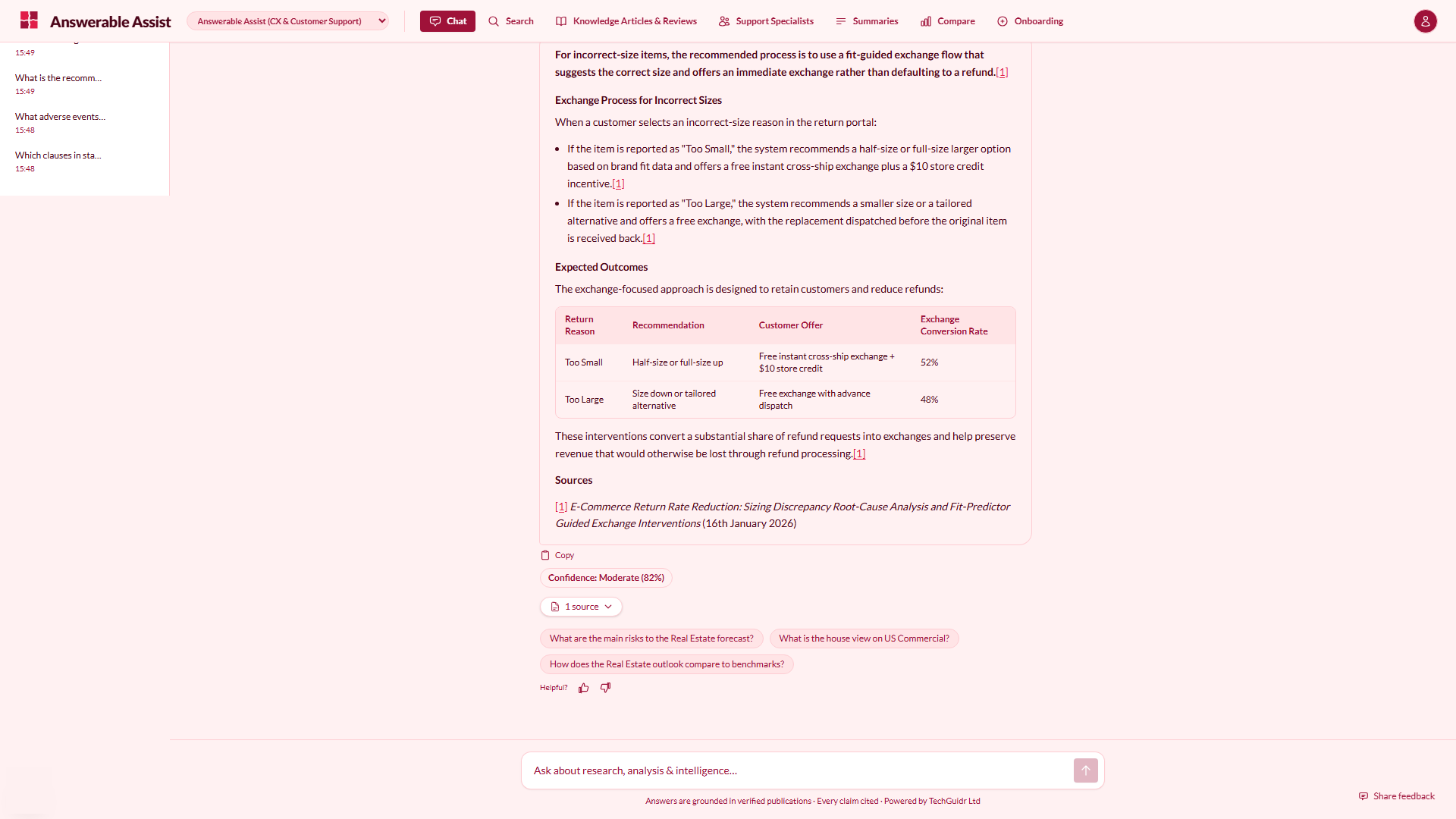
Assist is set up for support teams: knowledge base, tickets, reviews and policies. Systems covers technical documentation, runbooks and incident logs for engineers. Both are shown on real screens from demonstration environments.
See every configurationAnswerable Assist: CX & Customer Support
Set up for customer service: knowledge base, support tickets, product reviews, sizing guides and return policies.
 (opens the screen full size in a new tab)
Proof
What we have built and done
Each item says where it comes from: TechGuidr’s own products, the founder’s earlier roles or demonstration configurations.
- Founder’s earlier role
Studio analytics in the early days of Azure
At Microsoft, Dan centralised analytics for AAA games studios on a young Azure, and dogfooded the internal tooling that later became Power BI. This is experience from an earlier role, not TechGuidr client work.
See earlier work - Demonstration configuration
Answerable Assist and Systems
Configurations for support answers and engineering knowledge, shown on illustrative content.
See the configurations
How we engage
Where to start
Every engagement starts from the decision or outcome you need. Prices are starting points and exclude VAT.
- AI Work Reviewfrom £7,500Ten working days: where expert time and value leak, the top three opportunities, readiness, controls, economics and a prioritised roadmap.
- AI Work Sprintfrom £25,000One working workflow on your own information, with citations, permissions, expert review, evaluation and before-and-after measurement.
- Discoveryfrom £7,500Findings, options and a recommendation as a standalone deliverable. Typically one to three weeks.
- Build & Productionisefrom £15,000AI, data and software systems built and taken into production, in working increments. Larger builds scoped in phases.
- Technology Due Diligencefrom £10,000Independent technology, data and AI assessment with a red-flag report to an agreed timetable.
- Leadership as a Servicefrom £7,500 a monthSenior technology, data and AI leadership on an agreed monthly remit. Full-time placement is separate.
Industries
Related industries
- Research & insightResearch firms, analysts, market and economic intelligence, proprietary data businesses and specialist advisers.Explore research & insight
- Retail & consumerRetailers and consumer brands making trading, range and customer decisions on store, digital and supply-chain data.Explore retail & consumer
- Technology & softwareSoftware, SaaS and technology businesses building AI into products and platforms that need to scale.Explore technology & software
Bring the player, studio or support problem
We will tell you what sits underneath it and where data or AI would genuinely help.